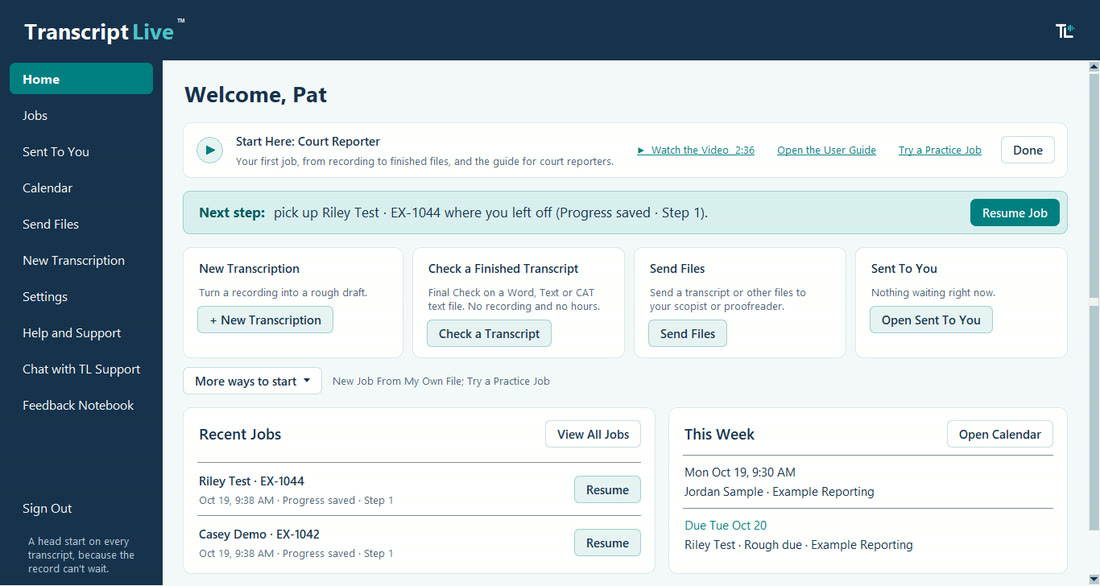
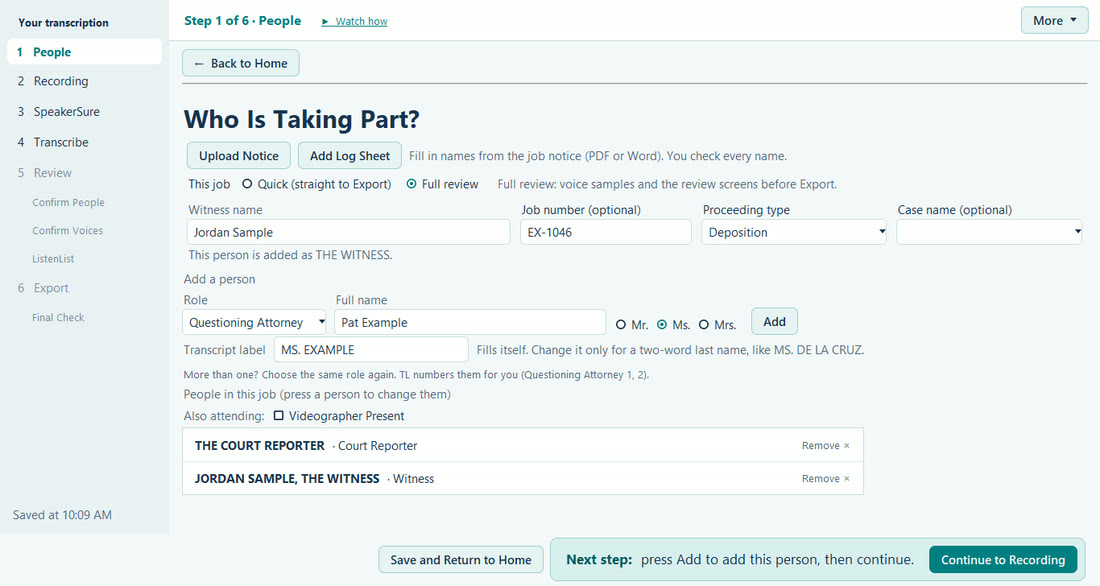
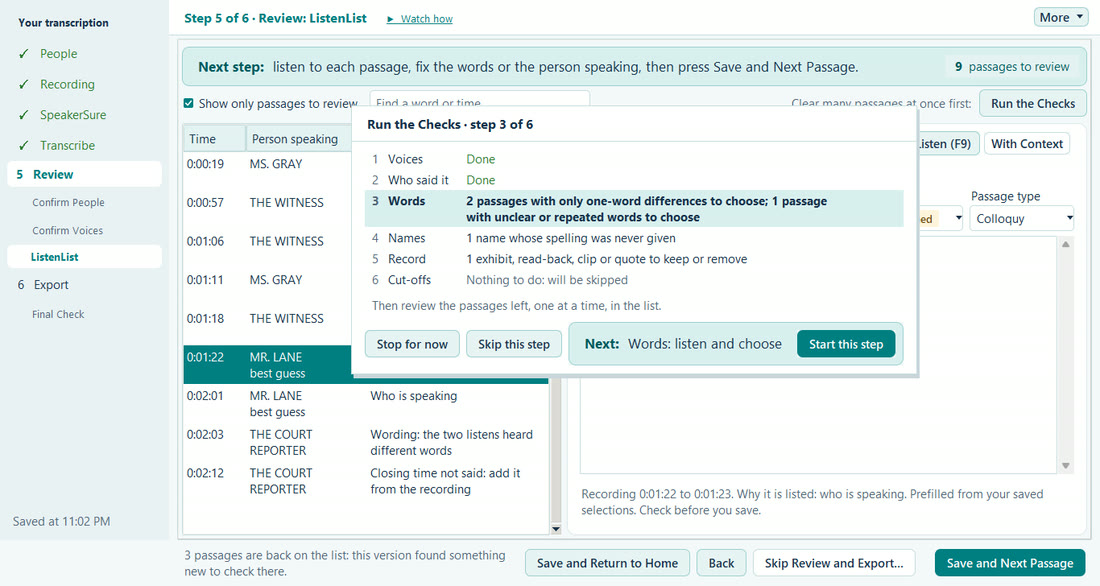
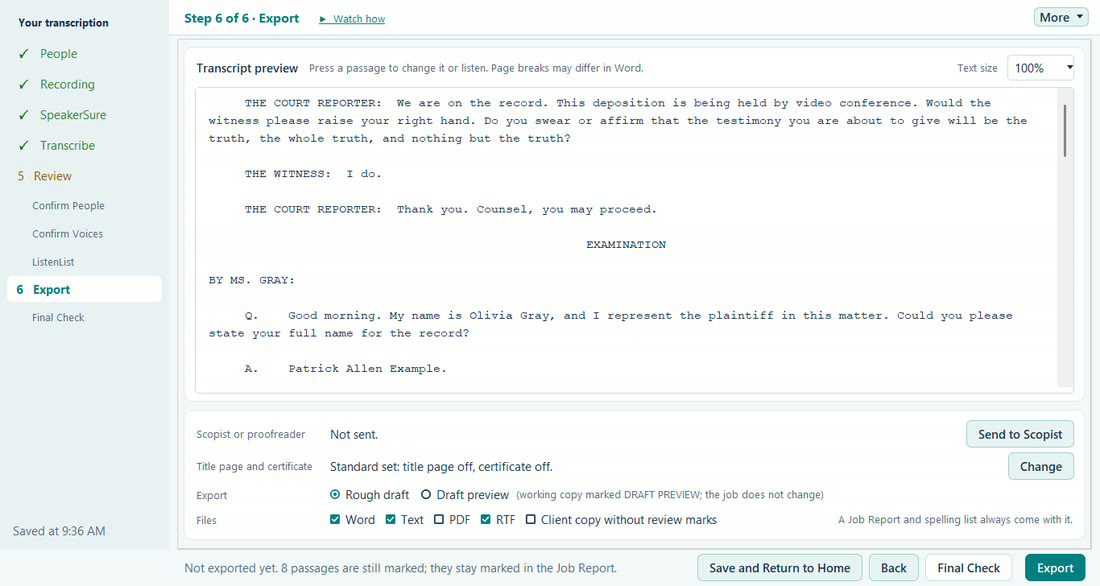
Real TL screens from the practice job. All names are made up. Tap a screen to see it full size.
1Know your next step. Home shows the Start Here card for your role, where you left off, your recent jobs, and this week's bookings and due dates.
2Set up the job. Upload the notice or a court log sheet, and TL fills in the names for you to check. Add anyone else who speaks.
3Review your draft. Listen to the whole job. Run the Checks helps you work through the flags as you go.
4Export and check. Export Word, text, and RTF for your CAT software, or send the job to your scopist. Final Check runs consistency checks before you certify.
What TL does
From assignment to delivery, keep the whole job moving.
Bookings, due dates, the people in each job, review, your scopist and proofreader, and delivery stay connected in one place. You stay in control of the record.
Plan the work. Forward a job notice, and TL fills in a booking with every job detail the notice states, for you to check. Bookings and rough and final due dates sit in one calendar, with This Week on Home and overdue work in red.
Set up each job. List who is taking part, then add your recording. SpeakerSure™ voice matching links each voice to the people in your job, and anything uncertain goes to your review. Built for depositions, EUOs, hearings, trials, arbitrations, and meetings, including jobs with videographers, five or more speakers, and long remote recordings. Court recordings work too, with the court log sheet as a guide to names and spellings.
Review with ListenList™. Choose Full Review or Quick Review for each job. In Full Review, you listen to the whole job, and each flagged passage shows why TL flagged it. Run the Checks helps you work through the flags. A foot pedal set to send keys can play, go back, stop, and jump to the next unsure part.
Hand off and deliver. Send the job to your scopist or proofreader, then export Word, .txt, or RTF/CRE for your CAT software. Job notes come with the export, and the Job Report gives the recording time for each place TL is unsure of. When your transcript is finished, Final Check runs consistency checks before you certify.
You still listen to the whole job, and the reporter certifies the record.
Available now
More of the job, handled the way a reporter would.
Less time on the steps around each job, so you have more time before every due date.
Forward the notice. TL fills in the booking.
Turn on forwarding, then forward any job notice or assignment email from your account email to your own TL address. TL reads every job detail the notice states, such as the date, time, place or video link, case, witness, agency, attorneys, and due dates, and fills in a booking for you to check. Any box the notice does not fill says Not in notice. One click adds it to your calendar.
Who it helps: anyone who books jobs from emailed notices.
One calendar for bookings and due dates
Bookings and rough and final due dates sit in one calendar. This Week on Home shows what is next so nothing slips, with overdue work in red. You can also add the calendar to Google, Outlook, or Apple Calendar.
Who it helps: anyone who keeps track of bookings and due dates.
Court recordings, read as one set
Choose an FTR folder or zip, and TL reads the whole set: the sessions in order, the time not recorded between them, and only the microphones that have sound. A Digital Court Recorder (.dcr) file opens with a box to select and a Listen button for each microphone. Add the court log sheet, and its full names go into your spellings. Video or audio played in court is transcribed too, after your own played-video or played-audio wording, and breaks get your break wording. Your court files are never changed.
Who it helps: digital reporters, officials, and transcribers who work from court recordings.
Check a finished transcript, even one TL did not draft
From Home, choose Check a Finished Transcript and pick a Word file, a text file, or the text file your CAT program makes. Final Check runs consistency checks before you certify: names spelled two ways, missing BY lines, Q. and A. out of order, exhibit numbers, marks left in the text, and layout against your formatting. It reads the file on your computer, never changes it, sends nothing, and is not counted against your hours. You review and certify; the check certifies nothing.
Who it helps: court reporters, scopists, and proofreaders finishing any transcript.
Off the record stays off the record
TL takes break talk it is sure of, and any Social Security number said off the record, out of your draft, your job files, and any copy you send. The draft shows a break parenthetical. If TL is not sure, TL leaves nothing out and asks you.
Who it helps: court reporters, scopists, and proofreaders.
Linked with your team
Only the person you name can download a copy you send, and a copy sent back is deleted from our server once your TL collects it. Link with your scopist, proofreader, or agency to share rough and final due dates, and nothing else.
Who it helps: court reporters, scopists, proofreaders, and agencies.
Check your own rough
Optional. Add your own CAT rough file or RTF/CRE export to see every difference from TL's draft, with the recording time. Your file never changes the draft.
Who it helps: court reporters who have their own CAT rough file or RTF/CRE export.
Invoices from a finished job
Choose Make Invoice on a finished job. TL fills in the job, uses your own rates or the agency's, and saves a numbered PDF and Word invoice. One list shows every invoice, paid or unpaid.
Accept or decline a job notice
Open a forwarded job notice in TL and press Accept or Decline. TL emails your answer to the agency that sent the notice.
Review one item at a time
ListenList, Who Said It, Names, and Name the Voices go one item at a time. The audio plays on its own, and the keyboard does every step.
Ready to Send
A one-minute report before you send a draft, and a summary when your rough is ready.
Playback speed and a spelling sheet
Slow down or speed up playback while you review, and give the attorneys a spelling sheet of the names in the job.
Send your own files
Send your own transcript, CAT file, or recording to your scopist or proofreader. Each one is locked so only that person can open it, on a computer they have confirmed.
Before and after the record
Talk before the record opens or after it closes, and announcements such as "Recording in progress," show in parentheses, never as testimony, until you choose Keep or Leave out.
Exhibits and read-backs
Exhibit markings, read-backs, clips played, and text read aloud are offered as parentheticals you can keep, remove, or reword. Testimony words never change.
Small differences, one short list
Small one-word differences come together in one short list. Yes/no answers, negations, and numbers are never in that list, and an unsure yes/no answer stays marked until you decide.
People you work with
Names, roles, and firms of the people you work with are kept only on your computer and suggested as you type.
No silent failures
TL tells you on screen when something cannot be checked, saved, or sent. If the transcription service is busy, TL tries again, says so, and never sends an online job twice.
Ready before you export
If passages are still marked, TL asks first: review them, or export anyway with the Job Report listing them.
Full Review or Quick Review, job by job
In Step 1, choose Full Review, with voice samples and ListenList™, or Quick Review, which goes straight to Export with clean Word and text files and a Job Report of every place TL is unsure of, with its page and line. Every spoken word is kept the same way on both paths.
Sent To You
Jobs and files sent to you wait in one list on Home, with a count. A pop-up says when something arrives, and the button you need sits beside the one you pick.
Start from a published layout
Start From a Common Layout fills in page settings from a published transcript format for federal courts, California, Florida, Georgia, New York, or Texas, names its source, and says what TL cannot match.
Your notes, put to work
One Notes and log sheets card takes a court log sheet, your typed notes, or a case paper such as an exhibit list. Names go into Spellings, where you can remove any, and a printable notes form helps you note who spoke when.
Chat with TL Support
Ask a quick question from Help and Support and read the answer in the same chat, or by email if TL is closed. While you type, TL points to User Guide sections that may already answer it.
What sets TL apart
Made by someone who does the job.
Most tools in this field are built by tech companies for anyone with audio. TranscriptLive is built by a working court reporter for the people who produce the record.
A rough draft for your review
When you want one, TL can also prepare a formatted rough draft for your review. You go through the whole job, and you decide every change.
TL formats like a transcript
Q and A, colloquy, and BY lines laid out the way a reporter would, not a wall of text you have to rebuild.
TL follows your style
Numbers, tag questions, acknowledgment paragraphs, long answers in paragraphs, a closing line with the time, your examination heading, and an optional index page, each one on or off in your formatting preferences. Start from a published layout, or copy the layout of a transcript you already made.
1BY MS. PARK:
2 Q. Where were you working in March of last year?
3 A. At the distribution center in Marietta.
4 Q. And what were your duties there?
5 A. I supervised the receiving dock -- the inbound
6trucks, mostly.
7 MR. CHEN: Objection to form.
8 THE WITNESS: Can I still answer?
9 MS. ALVAREZ: You may answer.
10 THE WITNESS: Mostly the inbound trucks.
11 (Exhibit 4 was marked for identification.)
12BY MS. PARK:
13 Q. I am handing you what has been marked as
14Exhibit 4. Do you recognize it?
15 A. Yes.
A made-up example of TL's rough draft layout. Your own formatting choices change it.
Who TL is for
For everyone who touches the record.
Choose your role in TL: Court reporter, Transcriber or agency, Scopist, or Proofreader. Setup, Home, and each new job follow it, and you can change it at any time.
Court reporters
For Stenographers, Voice Writers, and Digital Reporters. A formatted rough draft, plus your bookings, due dates, scopist, and proofreader in one place. FTR and Digital Court Recorder files work too.
Scopists
Jobs sent to you wait in Sent To You on Home. See what TL flagged as you go through the whole file, then send it back.
Proofreaders
Jobs sent to you wait in Sent To You on Home. See what TL flagged and what was confirmed as you go through the whole transcript, then send back your notes.
Transcriptionists
Choose Transcriber or agency, and each job takes four steps, straight to clean Word and text files in your own text layout, with a Job Report of every place TL is unsure of. Your time goes to listening.
Agencies
Link with your reporters, scopists, and proofreaders. See the due dates your reporters share, read-only in your TL calendar.
From beta testers
What testers say after real jobs.
"As a working court reporter, I can honestly say this has completely changed the way I prepare transcripts ... What used to take me THREE DAYS, I have accomplished in ONE! ... It was created BY a court reporter, FOR court reporters, and it shows in absolutely every detail."
Mandie Parker, CCR TranscriptLive partner
"As a beta tester for TranscriptLive, I can already see how much time this software is going to save me ... One of the best parts of this experience has been working with a court reporter who truly understands the industry and is also the developer behind the software. He is incredibly helpful, open to feedback, and willing to customize things to make sure they work for you and your specific workflow."
Beta testers used TL free during the beta and received free draft hours. Quotes are shared with each tester's permission, in their own words. Results vary.
Our commitment
Built to protect the profession, not replace it.
I am a working court reporter, nationally certified as a voice writer, and I know how many of us feel about AI. We have watched software get pitched as a way to take the reporter out of the room. TranscriptLive is the opposite. TL is built first for the professionals who make the record and built to work alongside them.
TL helps manage the workload around every job, from booking and an optional rough draft to working with your scopist and proofreader and delivering to your CAT software, so you can spend your time on what takes real skill: listening, judgment, and getting the record right. TL never certifies anything. The reporter certifies the record. TL assists.
My goal is to make TranscriptLive the workspace built by a court reporter for court reporters, scopists, proofreaders, transcriptionists, and agencies, and to help keep this profession strong for the next generation.
Every plan includes the full TranscriptLive™ workspace: bookings, your calendar, Send to Scopist, and a formatted rough draft whenever you want one.
Your TL hours buy a transcript, not just words. Every draft comes with Q. and A., BY lines, and speaker labels in place, exports to RTF/CRE, Word, and text for your CAT software, a Final Check before you certify, and returned changes from your scopist that you Keep or Undo one by one.
Founding price for the first 100 paying users, locked for 12 months. Paid plans open Wednesday, October 28. Join the waitlist to hear first, or register for the free webinar on October 28 at 7:00 PM Eastern.
Support included: TL Support replies within 1 business day, and the same day when possible for an urgent billing problem.
Silver
22 audio hours a month
Regular $179
$159 /month
Founding price, save $20 a month
Extra hours $7 each
Yearly: pay for 11 months, get 12
Support included: TL Support replies within 1 business day, and the same day when possible for an urgent billing problem.
Gold
40 audio hours a month
Regular $309
$279 /month
Founding price, save $30 a month
Extra hours $6.75 each
Yearly: pay for 11 months, get 12
Support included: TL Support replies within 1 business day, and the same day when possible for an urgent billing problem.
Platinum
60 audio hours a month
Regular $419
$379 /month
Founding price, save $40 a month
Extra hours $6 each
Yearly: pay for 11 months, get 12
Support included: TL Support replies within 1 business day, and the same day when possible for an urgent billing problem.
Workspace
$19 a month. The workspace for jobs you write yourself or receive from others, with no audio hours included.
Support included: TL Support replies within 1 business day, and the same day when possible for an urgent billing problem.
Pay as you go
Hour packs, 5 hours for $55 or 20 hours for $200. No monthly plan. Packs last 12 months.
Support included: TL Support replies within 1 business day, and the same day when possible for an urgent billing problem.
More than 60 hours, teams, and agencies
Need more than 60 audio hours a month, or a plan for several people? Write to TL Support at support@transcriptlive.com, and we will set up a plan that fits.
Free trial: 5 audio hours on any monthly plan from Bronze to Platinum. A card is needed to start, and the plan begins after 5 hours or 30 days.
Founding prices are for the first 100 paying users and last 12 months from the first payment. After that, the regular price applies, and we email you 30 days before it changes. The founding price ends when you change to another plan or switch between monthly and yearly. You then pay the regular price of the new plan.
Yearly plans cost 11 times the monthly price you pay, so founding users pay 11 times their founding price.
Unused plan hours carry over for one month. Extra hours and hour packs last 12 months.
Prices are in US dollars.
Questions
Good to know
Does TL work with my CAT software?
Yes. TL exports RTF/CRE and .txt files your CAT software can import, or a Word file you can work in directly. RTF is selected on every export to start, and you can clear it. CAT software is not required.
Can TL make my invoices?
Yes. Choose Make Invoice on a finished job. TL fills in the job and its page count, uses your own rate card or the agency's rate sheet, and saves a numbered invoice as PDF and Word in the job folder. Invoices stay on your computer, and you send them yourself. One list shows every invoice, paid or unpaid.
Can I use TL without a TL rough draft?
Yes. New Job From My Own File keeps your own transcript, CAT file, or recording in TL with dates, notes, and history, and TL never reads what is inside it. Send Files sends it, locked, to your scopist or proofreader, and what comes back is saved as a new dated version. Review steps need a TL rough draft.
What do I need to use TL?
TranscriptLive works best on Windows 11 (64-bit). Windows 10 also works. TranscriptLive is not available for Mac. You also need an internet connection and, for a rough draft, your audio or video recording (MP3, M4A, WAV, FLAC, Opus, WMA, AAC, MP4, and more, in one part or several). Court recordings work too: an FTR folder or zip, or a Digital Court Recorder (.dcr) file. TL is for users in the United States and Canada.
Can TL check a transcript TL did not draft?
Yes. Check a Finished Transcript on Home runs Final Check on a Word file, a text file, or the text file your CAT program makes, with no recording and no job. It reads the file on your computer, never changes it, sends nothing, and is not counted against your hours.
Can I start from my state's transcript format?
Yes, for federal courts, California, Florida, Georgia, New York, and Texas. Start From a Common Layout fills in the page settings from that published format, names where the rule comes from, and says what TL cannot match. You can also copy the layout of a transcript you already made, or set each value yourself.
I am a transcriber, not a court reporter. Does TL fit my work?
Yes. Choose Transcriber or agency as your role. Each new job then takes four steps and goes straight to Export, with clean Word and text files in your own text layout and a Job Report listing every place TL is unsure of, with its page and line. You can change your role at any time in Settings.
Do my scopist and proofreader need TL?
Yes. Scopists and proofreaders use the Workspace plan, $19 a month. They install TL, sign in once with their own account, and see only the job copies sent to them. You can invite them from TL, or TL Support can add them.
Where do I get help?
The User Guide covers every step. Guides for each role are at transcriptlive.com/guides. In TL, Help and Support has Chat with TL Support for quick questions, and TL Support also answers at support@transcriptlive.com. TL Support replies within 1 business day, and the same day when possible for an urgent billing problem.
Does my audio leave my computer?
Yes, to be transcribed. Every TL rough draft job is processed online through TranscriptLive. TL sends your recording, the job's spellings, word lists, and people's names, and the voice sample clips you chose, over an encrypted connection to our secure server in the United States, then to our transcription service. Your notes, log sheets, and case papers stay on your computer. Your recording reaches our service as "recording" under a plain title such as "Job from 10/17, 58 min". When the job is done, the finished text is sent once more for the required safety check, and only the category counts are kept. After your recording is transcribed, TL reads the whole draft once more before you review it. For that check, the draft's text goes through our secure server to a text processing service under written zero-retention and no-training terms. The audio is not sent again.
Our transcription service keeps no audio and no text after it returns the result. Our server starts deleting your recording and job files when the job finishes and you have collected the draft. A draft never collected is deleted after 14 days, an upload you did not finish after 3 days, and a job paused at your budget limit after 60 days.
Can TL run while my computer is off?
Yes. Send a job, close your laptop, and your draft shows up under Jobs the next time you open TL. If you choose, TL also emails you when your draft is ready: select "Email me when a transcription is complete" in Settings, under Email Notifications. The email never includes case details.
What does TL cost?
Plans run from $85 to $419 a month for 8 to 60 audio hours. The first 100 paying users get a founding price, from $75 a month, locked for 12 months. Workspace without transcription is $19 a month. Pay as you go: hour packs, 5 hours for $55 or 20 hours for $200. See every plan.
Waitlist
Join the TranscriptLive waitlist.
Beta sign-ups are closed. Join the waitlist, and we will email you as soon as TL opens to more court reporters, scopists, proofreaders, transcriptionists, and agencies. The first 100 paying users get the founding price for 12 months.
We only use your email to tell you about TranscriptLive. No spam, and it is never sold or shared.